• Active Directory Forest Explained | Simple Guide for Beginners

    In this video, we’ll explain the concept of an Active Directory Forest in the easiest terms possible. You’ll learn how it serves as the top-level container in an AD environment, allowing multiple domains to coexist, share resources, and maintain security boundaries.

    Watch Here: https://www.youtube.com/watch?v=Q9jkonGzcBk

    #activedirectory #adforest #microsoftad #sysadmin #itinfrastructure #cybersecuritybasics #infosectrain #adds #windowsserver #ittraining
    Active Directory Forest Explained | Simple Guide for Beginners In this video, we’ll explain the concept of an Active Directory Forest in the easiest terms possible. You’ll learn how it serves as the top-level container in an AD environment, allowing multiple domains to coexist, share resources, and maintain security boundaries. Watch Here: https://www.youtube.com/watch?v=Q9jkonGzcBk #activedirectory #adforest #microsoftad #sysadmin #itinfrastructure #cybersecuritybasics #infosectrain #adds #windowsserver #ittraining
    0 Commenti 0 condivisioni 965 Views 0 Anteprima
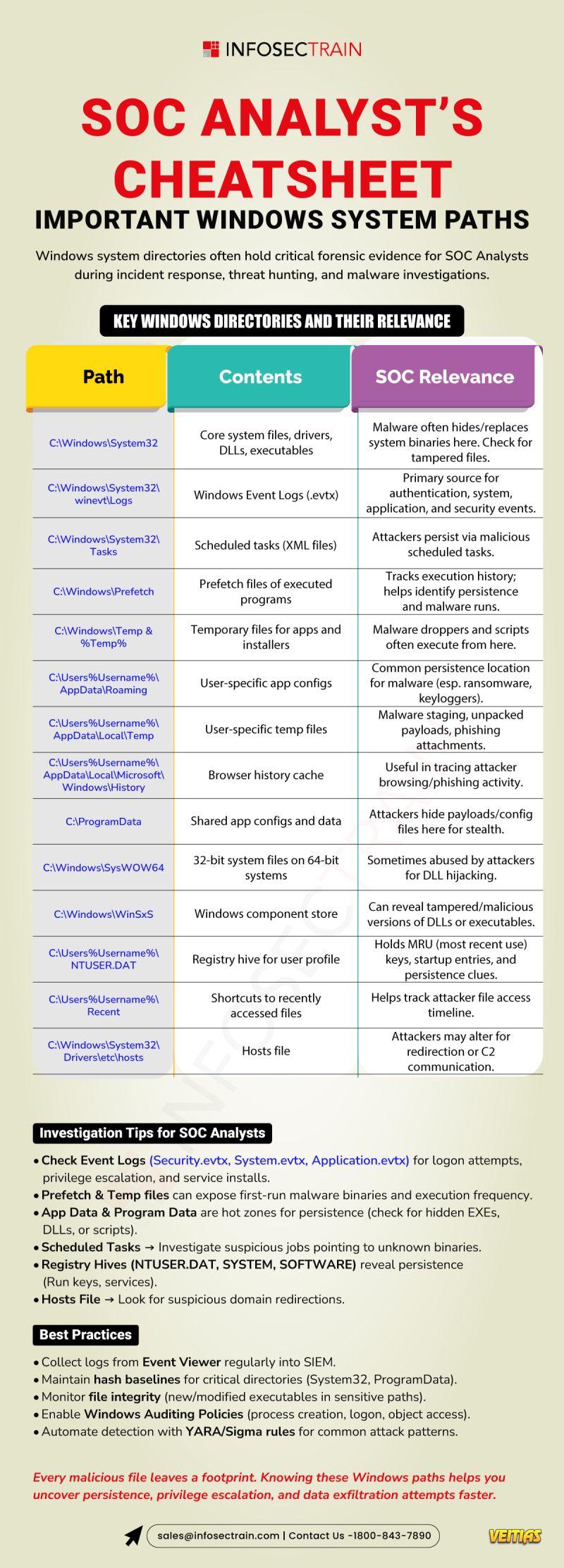
  • When seconds matter, knowing where to look wins investigations. From C:\Windows\System32 to AppData\Roaming and scheduled tasks, these Windows paths are where persistence, tampering, and attacker footprints hide.
    Check Event Logs, Prefetch, Temp folders, ProgramData and NTUSER.DAT early — they often reveal first-run binaries, stealthy persistence mechanisms, and timeline clues that SIEM alerts alone can miss.
    Pro tip: baseline hashes, enable process creation auditing, and automate detection with YARA/Sigma rules to turn noisy signals into actionable leads. ⚡️
    Whether you’re hunting malware, triaging an incident, or building playbooks — map these paths into your runbooks and make them your default starting points.
    Save this post for your next tabletop or onboarding session — and share with your team.
    When seconds matter, knowing where to look wins investigations. From C:\Windows\System32 to AppData\Roaming and scheduled tasks, these Windows paths are where persistence, tampering, and attacker footprints hide. 🔎 Check Event Logs, Prefetch, Temp folders, ProgramData and NTUSER.DAT early — they often reveal first-run binaries, stealthy persistence mechanisms, and timeline clues that SIEM alerts alone can miss. Pro tip: baseline hashes, enable process creation auditing, and automate detection with YARA/Sigma rules to turn noisy signals into actionable leads. ⚡️ Whether you’re hunting malware, triaging an incident, or building playbooks — map these paths into your runbooks and make them your default starting points. Save this post for your next tabletop or onboarding session — and share with your team. 👥
    0 Commenti 0 condivisioni 769 Views 0 Anteprima
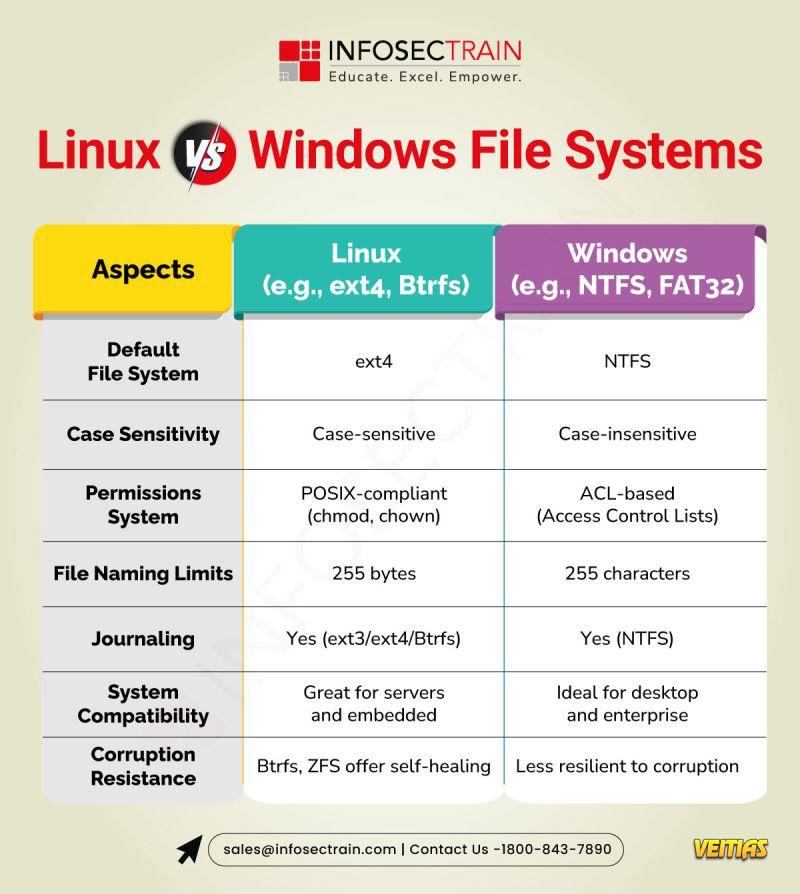
  • Linux commonly uses ext4, XFS, or Btrfs, which are designed for stability, security, and better handling of large files. These file systems support advanced features like journaling, symbolic links, and case sensitivity. Windows, on the other hand, mainly uses NTFS, which offers good compatibility, built-in encryption, and strong support for permissions but is less flexible than Linux file systems. In general, Linux file systems are preferred for servers and performance-heavy tasks, while NTFS is optimized for desktop use and Windows environments.
    Linux commonly uses ext4, XFS, or Btrfs, which are designed for stability, security, and better handling of large files. These file systems support advanced features like journaling, symbolic links, and case sensitivity. Windows, on the other hand, mainly uses NTFS, which offers good compatibility, built-in encryption, and strong support for permissions but is less flexible than Linux file systems. In general, Linux file systems are preferred for servers and performance-heavy tasks, while NTFS is optimized for desktop use and Windows environments.
    0 Commenti 0 condivisioni 2621 Views 0 Anteprima
  • Understanding Linux vs Windows File Systems

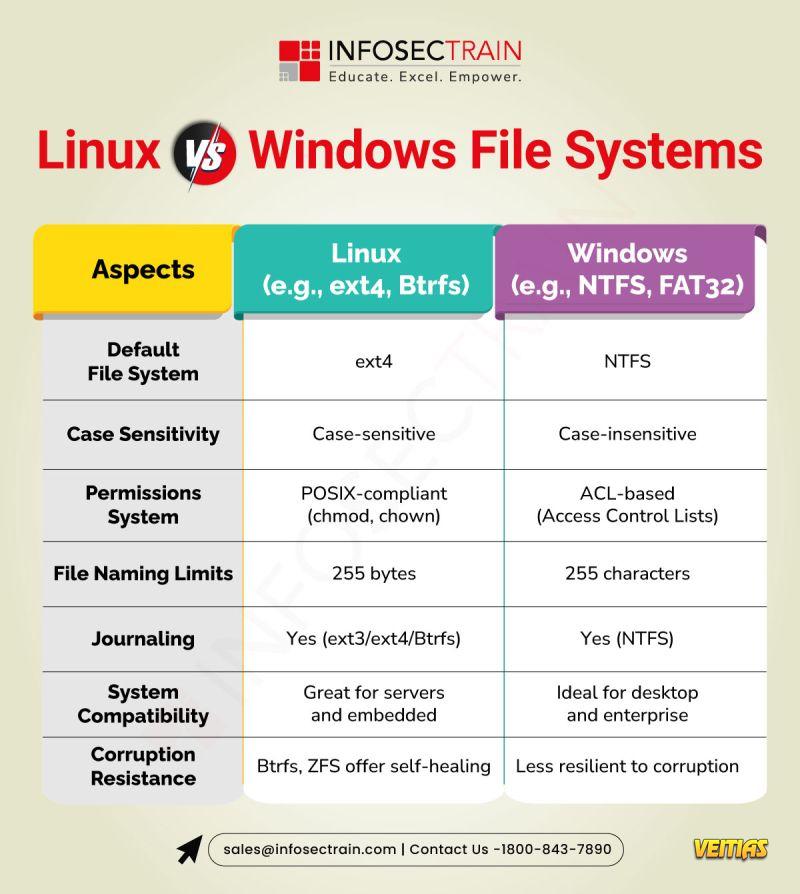
    Linux uses a unified, tree-structured file system starting at the root (“/”), while Windows manages files across lettered drives like C: and D. In Linux, files are case-sensitive and devices are treated as files. Windows is case-insensitive and classifies devices separately.

    Knowing these differences is crucial for sysadmins, developers, and security pros working in multi-OS environments.

    Don’t miss out! Enroll here to join InfosecTrain Free Webinar and unlock expert insights. https://www.infosectrain.com/events/

    #Linux #Windows #FileSystem #SysAdmin #InfosecTrain
    Understanding Linux vs Windows File Systems Linux uses a unified, tree-structured file system starting at the root (“/”), while Windows manages files across lettered drives like C: and D. In Linux, files are case-sensitive and devices are treated as files. Windows is case-insensitive and classifies devices separately. Knowing these differences is crucial for sysadmins, developers, and security pros working in multi-OS environments. Don’t miss out! Enroll here to join InfosecTrain Free Webinar and unlock expert insights. 👉 https://www.infosectrain.com/events/ #Linux #Windows #FileSystem #SysAdmin #InfosecTrain
    0 Commenti 0 condivisioni 1828 Views 0 Anteprima
  • 𝐃𝐨 𝐲𝐨𝐮 𝐭𝐡𝐢𝐧𝐤 "𝐩𝐞𝐫𝐦𝐚𝐧𝐞𝐧𝐭𝐥𝐲 𝐝𝐞𝐥𝐞𝐭𝐞𝐝" 𝐦𝐞𝐚𝐧𝐬 𝐲𝐨𝐮𝐫 𝐟𝐢𝐥𝐞𝐬 𝐰𝐢𝐥𝐥 𝐧𝐞𝐯𝐞𝐫 𝐜𝐨𝐦𝐞 𝐛𝐚𝐜𝐤? 𝐓𝐡𝐢𝐧𝐤 𝐚𝐠𝐚𝐢𝐧!

    Unless the information on your drive has been overwritten most files stay buried in your drive. Timing is key. It can be the difference between recovering the file or losing it.

    𝐇𝐞𝐫𝐞 𝐢𝐬 𝐰𝐡𝐚𝐭 𝐲𝐨𝐮 𝐧𝐞𝐞𝐝 𝐭𝐨 𝐝𝐨
    Stop using the drive
    Check your backups (cloud, external, restore points)
    Use trusted recovery tools for Windows/Mac/Linux
    Save recovered files to a different drive.
    Backup regularly to prevent this happening again!

    Read more: https://www.infosectrain.com/blog/how-to-recover-permanently-deleted-files-step-by-step-guide/

    Prevention is better than panic. Don’t wait for a data disaster to value your backups.

    #DataRecovery #CyberSecurity #FileRecovery #TechTips #Infosectrain
    𝐃𝐨 𝐲𝐨𝐮 𝐭𝐡𝐢𝐧𝐤 "𝐩𝐞𝐫𝐦𝐚𝐧𝐞𝐧𝐭𝐥𝐲 𝐝𝐞𝐥𝐞𝐭𝐞𝐝" 𝐦𝐞𝐚𝐧𝐬 𝐲𝐨𝐮𝐫 𝐟𝐢𝐥𝐞𝐬 𝐰𝐢𝐥𝐥 𝐧𝐞𝐯𝐞𝐫 𝐜𝐨𝐦𝐞 𝐛𝐚𝐜𝐤? 𝐓𝐡𝐢𝐧𝐤 𝐚𝐠𝐚𝐢𝐧! Unless the information on your drive has been overwritten most files stay buried in your drive. Timing is key. It can be the difference between recovering the file or losing it. 𝐇𝐞𝐫𝐞 𝐢𝐬 𝐰𝐡𝐚𝐭 𝐲𝐨𝐮 𝐧𝐞𝐞𝐝 𝐭𝐨 𝐝𝐨 ⬇️ ✅ Stop using the drive ✅ Check your backups (cloud, external, restore points) ✅ Use trusted recovery tools for Windows/Mac/Linux ✅ Save recovered files to a different drive. ✅ Backup regularly to prevent this happening again! 👉 Read more: https://www.infosectrain.com/blog/how-to-recover-permanently-deleted-files-step-by-step-guide/ 💡Prevention is better than panic. Don’t wait for a data disaster to value your backups. #DataRecovery #CyberSecurity #FileRecovery #TechTips #Infosectrain
    WWW.INFOSECTRAIN.COM
    How to Recover Permanently Deleted Files: Step-by-Step Guide
    Learn effective methods to recover permanently deleted files from Windows, Mac, and storage devices. Step-by-step recovery tips by InfosecTrain.
    0 Commenti 0 condivisioni 3491 Views 0 Anteprima
  • Is it time to choose an endpoint security solution? 🛡

    Deciding between CrowdStrike Falcon and Microsoft Defender for Endpoint is a big step for any company.

    Both are strong EDR platforms, but their strategies differ significantly. Our quick-glance comparison simplifies the distinctions that make each one a key-feature:

    Type: CrowdStrike is a cloud-native EDR, while Defender is a Windows-native solution.

    Deployment: CrowdStrike has a lightweight agent for installation, but Defender comes as part of the Windows OS.

    OS Support: Falcon by CrowdStrike is a multi-platform product that supports Windows, macOS, and Linux, thus having a wider range. Defender for Endpoint is a tool tailored for Windows and gives only limited support for others.

    UI/UX: The interface of CrowdStrike is cool and easy for the analyst, while Defender stays well with the Microsoft 365 Defender ecosystem.

    #CrowdStrike #MicrosoftDefender #EndpointSecurity #Cybersecurity #EDR #InfoSec #CyberDefense #SecuritySolutions
    Is it time to choose an endpoint security solution? 🛡 Deciding between CrowdStrike Falcon and Microsoft Defender for Endpoint is a big step for any company. Both are strong EDR platforms, but their strategies differ significantly. Our quick-glance comparison simplifies the distinctions that make each one a key-feature: 🔹 Type: CrowdStrike is a cloud-native EDR, while Defender is a Windows-native solution. 🔹 Deployment: CrowdStrike has a lightweight agent for installation, but Defender comes as part of the Windows OS. 🔹 OS Support: Falcon by CrowdStrike is a multi-platform product that supports Windows, macOS, and Linux, thus having a wider range. Defender for Endpoint is a tool tailored for Windows and gives only limited support for others. 🔹 UI/UX: The interface of CrowdStrike is cool and easy for the analyst, while Defender stays well with the Microsoft 365 Defender ecosystem. #CrowdStrike #MicrosoftDefender #EndpointSecurity #Cybersecurity #EDR #InfoSec #CyberDefense #SecuritySolutions
    0 Commenti 0 condivisioni 2482 Views 0 Anteprima
  • Free Masterclass: Cybersecurity Career Roadmap – From Beginner to Pro

    Discover the step-by-step roadmap to becoming a successful cybersecurity professional!

    Date: 04 Sep (Thu)
    Time: 08:00 – 10:00 PM (IST)
    Speaker: Ashish Rawat

    Free Register Now: infosectrain.com/events/cybersecurity-career-roadmap-from-beginner-to-pro/

    What You’ll Learn in This Masterclass
    Why Cybersecurity is the most in-demand field today
    Career opportunities & domains (Defensive, Offensive, GRC, Cloud, AI)
    Skills & Certifications to kickstart your journey (ISC2 CC, CEH, Security+)
    Core foundations: Networking, Linux, Windows basics
    Mentorship on choosing the right path for YOU

    Why You Shouldn’t Miss It
    FREE Career Guidance & Mentorship
    Earn a CPE Certificate
    Learn directly from Industry Experts

    Your journey from Beginner → Pro in Cybersecurity starts HERE!

    #CyberSecurity #CareerGrowth #InfoSecTrain #CyberSecurityCareers #FreeWebinar #CEH #CISSP #SecurityPlus #CloudSecurity #GRC #EthicalHacking
    Free Masterclass: Cybersecurity Career Roadmap – From Beginner to Pro 🔐 Discover the step-by-step roadmap to becoming a successful cybersecurity professional! 📅 Date: 04 Sep (Thu) ⌚ Time: 08:00 – 10:00 PM (IST) 🎤 Speaker: Ashish Rawat 🔗 Free Register Now: infosectrain.com/events/cybersecurity-career-roadmap-from-beginner-to-pro/ ✨ What You’ll Learn in This Masterclass ✅ Why Cybersecurity is the most in-demand field today ✅ Career opportunities & domains (Defensive, Offensive, GRC, Cloud, AI) ✅ Skills & Certifications to kickstart your journey (ISC2 CC, CEH, Security+) ✅ Core foundations: Networking, Linux, Windows basics ✅ Mentorship on choosing the right path for YOU 🎁 Why You Shouldn’t Miss It 👉 FREE Career Guidance & Mentorship 👉 Earn a CPE Certificate 👉 Learn directly from Industry Experts 💡 Your journey from Beginner → Pro in Cybersecurity starts HERE! #CyberSecurity #CareerGrowth #InfoSecTrain #CyberSecurityCareers #FreeWebinar #CEH #CISSP #SecurityPlus #CloudSecurity #GRC #EthicalHacking
    0 Commenti 0 condivisioni 4650 Views 0 Anteprima
  • Stroud Tech Solutions

    Stroud Tech Solutions offers expert Computer Repair in Barrie and Collingwood. Trusted Computer Store for Laptop Repair and top Computer Stores in Barrie.

    About Company:-

    Stroudtech Solutions is an industry-leading service center, where we repair and provide services in all Apple, Microsoft Surface Pro, Windows, Linux, Samsung, HP, iPhone, iPad, PC computer, Dell, Console, Data recovery, Virus Removal, Website Design, Technical support, IT Consultant, and many more IT support in Barrie, innisfil, Bradford, Essa, Angus, Orillia ,Toronto, Markham, Newmarket and other cities within Simcoe county area. Your device and you are in good hands because Stroudtech Solutions has certified technicians who are experienced with pc computers, apple mac for many years.

    Click Here For More Info:- https://www.stroudtechsolutions.ca/

    Social Media Profile Links:-
    https://ca.pinterest.com/stroudtech/
    Stroud Tech Solutions Stroud Tech Solutions offers expert Computer Repair in Barrie and Collingwood. Trusted Computer Store for Laptop Repair and top Computer Stores in Barrie. About Company:- Stroudtech Solutions is an industry-leading service center, where we repair and provide services in all Apple, Microsoft Surface Pro, Windows, Linux, Samsung, HP, iPhone, iPad, PC computer, Dell, Console, Data recovery, Virus Removal, Website Design, Technical support, IT Consultant, and many more IT support in Barrie, innisfil, Bradford, Essa, Angus, Orillia ,Toronto, Markham, Newmarket and other cities within Simcoe county area. Your device and you are in good hands because Stroudtech Solutions has certified technicians who are experienced with pc computers, apple mac for many years. Click Here For More Info:- https://www.stroudtechsolutions.ca/ Social Media Profile Links:- https://ca.pinterest.com/stroudtech/
    0 Commenti 0 condivisioni 2793 Views 0 Anteprima
  • Struggling to remember Windows Authentication flows, token types, or best practices?

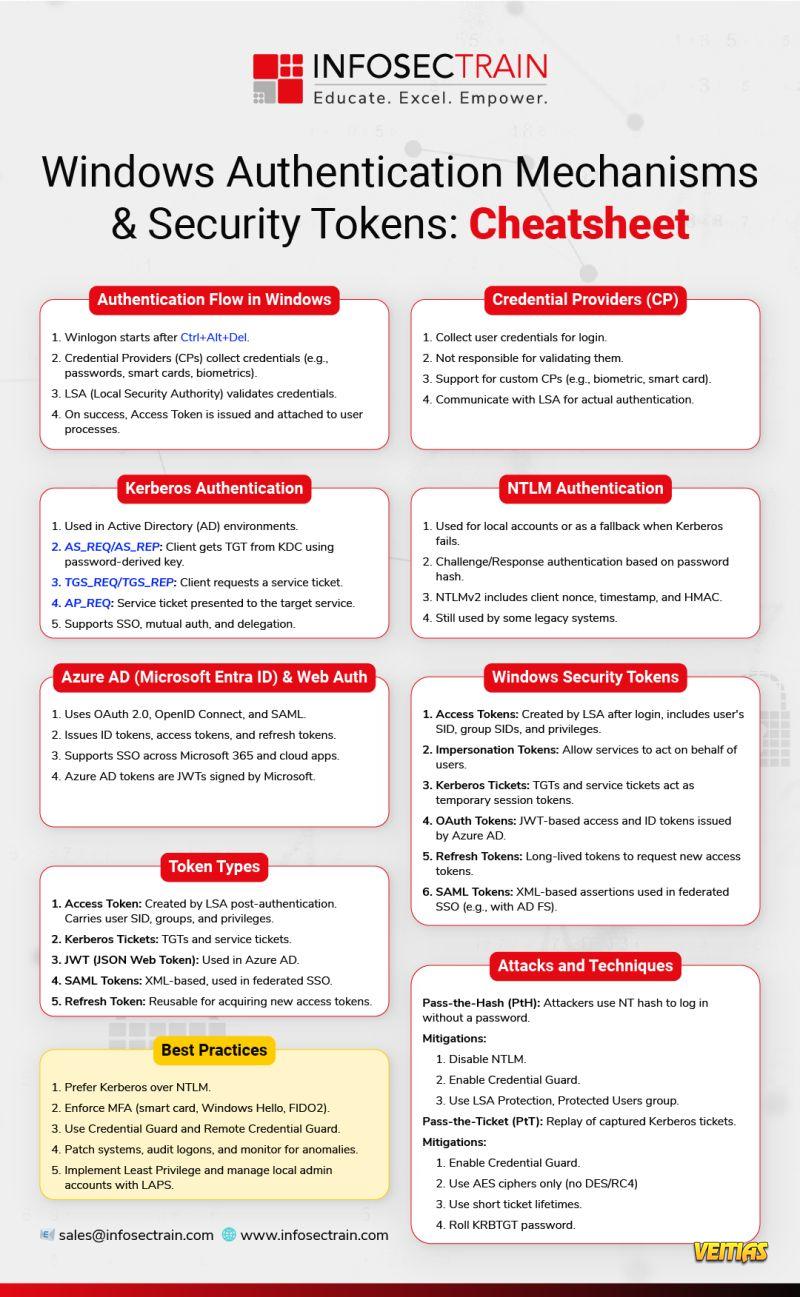
    We’ve got you covered with this all-in-one Cheatsheet for Windows Authentication Mechanisms & Security Tokens!

    What’s inside:
    Windows login flow & Credential Providers
    Kerberos vs. NTLM authentication
    Azure AD & Web Auth simplified
    Token types: Access, JWT, SAML, Refresh
    Security tokens & attack mitigations
    Pro tips & best practices

    Download the Cheatsheet & Strengthen Your Windows Security Game!

    #WindowsSecurity #Authentication #Kerberos #NTLM #Cybersecurity #SecurityTokens #AzureAD #InfoSecTrain #WindowsAuth #ITSecurity #SysAdminTools #CyberEssentials #SecurityCheatsheet #AccessTokens
    Struggling to remember Windows Authentication flows, token types, or best practices? We’ve got you covered with this all-in-one Cheatsheet for Windows Authentication Mechanisms & Security Tokens! 📌 What’s inside: ✅ Windows login flow & Credential Providers ✅ Kerberos vs. NTLM authentication ✅ Azure AD & Web Auth simplified ✅ Token types: Access, JWT, SAML, Refresh ✅ Security tokens & attack mitigations ✅ Pro tips & best practices 📥 Download the Cheatsheet & Strengthen Your Windows Security Game! #WindowsSecurity #Authentication #Kerberos #NTLM #Cybersecurity #SecurityTokens #AzureAD #InfoSecTrain #WindowsAuth #ITSecurity #SysAdminTools #CyberEssentials #SecurityCheatsheet #AccessTokens
    0 Commenti 0 condivisioni 4839 Views 0 Anteprima
  • The Windows Authentication Mechanisms & Security Tokens Cheatsheet is a quick-reference guide designed to help IT and cybersecurity professionals understand how authentication works in Windows environments. It covers key mechanisms like Kerberos, NTLM, and Smart Card logins, along with the role of security tokens in verifying identity and access. This cheatsheet simplifies complex concepts, making it easier to grasp credential handling, token types, and secure authentication flows in Windows systems.
    The Windows Authentication Mechanisms & Security Tokens Cheatsheet is a quick-reference guide designed to help IT and cybersecurity professionals understand how authentication works in Windows environments. It covers key mechanisms like Kerberos, NTLM, and Smart Card logins, along with the role of security tokens in verifying identity and access. This cheatsheet simplifies complex concepts, making it easier to grasp credential handling, token types, and secure authentication flows in Windows systems.
    0 Commenti 0 condivisioni 3301 Views 0 Anteprima
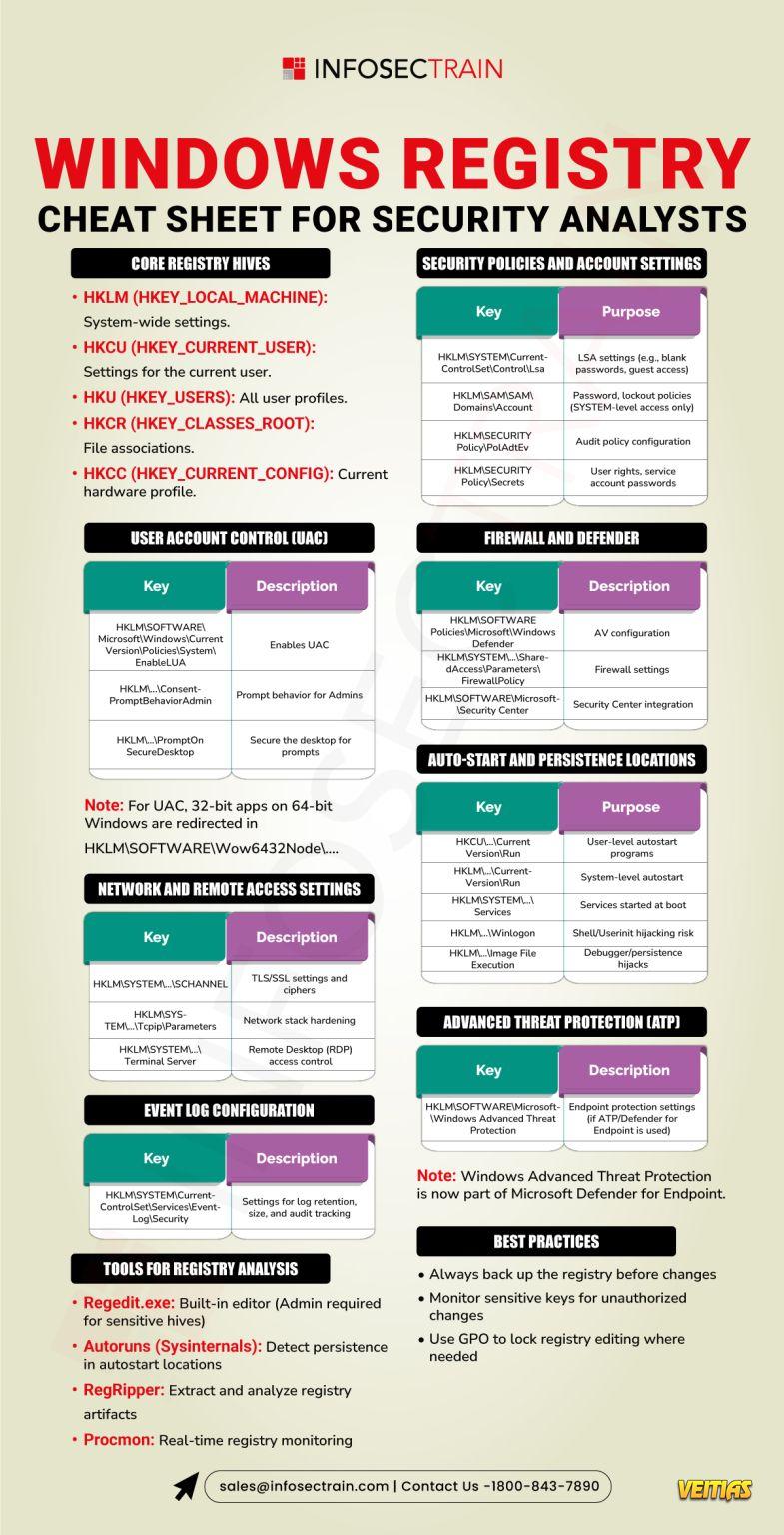
  • The Ultimate Windows Registry Cheat Sheet for Security Analysts serves as an invaluable resource for professionals engaged in digital forensics and incident response. This comprehensive guide consolidates critical registry paths and their interpretations, enabling analysts to efficiently extract and analyze data pertinent to user activities, system configurations, and potential security incidents. Key areas covered include system information, user accounts, software and services, network configurations, and hardware details.
    The Ultimate Windows Registry Cheat Sheet for Security Analysts serves as an invaluable resource for professionals engaged in digital forensics and incident response. This comprehensive guide consolidates critical registry paths and their interpretations, enabling analysts to efficiently extract and analyze data pertinent to user activities, system configurations, and potential security incidents. Key areas covered include system information, user accounts, software and services, network configurations, and hardware details.
    0 Commenti 0 condivisioni 2491 Views 0 Anteprima
  • Text-Based Logs vs. Windows Event Logs

    Not all logs are created equal! Whether you're monitoring a custom application or securing your entire Windows infrastructure, knowing the right logging approach is. From format, readability, and performance to SIEM integration and alerting, this infographic breaks down the key differences to help you make informed decisions.

    For more insights and expert training https://www.infosectrain.com/training-calendar/

    sales@infosectrain.com

    #CyberSecurity #Logging #SIEM #WindowsLogs #SystemAdmin #InfosecTrain #SecurityMonitoring #DigitalForensics #Infographic #ITSecurity #EventLogs #SysadminTips #SecurityTools
    Text-Based Logs vs. Windows Event Logs Not all logs are created equal! Whether you're monitoring a custom application or securing your entire Windows infrastructure, knowing the right logging approach is. From format, readability, and performance to SIEM integration and alerting, this infographic breaks down the key differences to help you make informed decisions. 📥 For more insights and expert training👉 https://www.infosectrain.com/training-calendar/ 📧 sales@infosectrain.com #CyberSecurity #Logging #SIEM #WindowsLogs #SystemAdmin #InfosecTrain #SecurityMonitoring #DigitalForensics #Infographic #ITSecurity #EventLogs #SysadminTips #SecurityTools
    0 Commenti 0 condivisioni 5323 Views 0 Anteprima
Pagine in Evidenza